Introduction to Malware analysis
A quick primer to malware analysis.
Introduction and Malware Analysis Lab Setup
This is sort of a primer to my main upcoming series where I analyze (or at least attempt to) a series of well-known malware in a beginner-friendly manner. This is not a definitive guide, I’m also learning as I go, so, if I get something wrong please don’t yell at me (◞‸◟)
This is also a very basic and elementary explanation of malware and its analysis, if you have some prior experience then feel free to skip this. As I said, I attempt to explain everything in a beginner-friendly manner. For someone who is pretty advanced(or even a novice) this may be somewhat lacking and basic.
Warning/Disclaimer
I am not an expert in malware analysis nor am I a malware developer, please take my word with a grain of salt and do your research before doing anything.
I take no responsibility or accountability for the infection of malicious software, programs, or files onto any computer or workstation. These projects are for educational purposes only. I do not condone the development, use, or spreading of programs to intentionally harm assets, networks, or individuals.
What is malware?
Malware or malicious software, is exactly as it sounds, it’s a piece of code that is intended to cause harm by stealing data, destroying systems, or damaging properties.
There are a plethora of categories in malware, each is designed with a specific goal in mind. Some examples of the types of malware are as follows :
1.RATs
- Ransomware
- Trojans
- Spyware
- Malware is written in many languages; high-level languages such as Python and also low-level languages like C, C++, and Rust. There can also be many malware that are written in a bit more obscure languages such as Nim or Go, But, these are outside the scope of this post (and frankly, outside my skill level)
How do we analyze malware?
- Now that we have a basic understanding of what malware is and why we analyze it, we can get a bit more technical.
Some preliminary information
For this whole project I’m going to focus on Windows malware. As it is one of the most popular attack surfaces. Of course, there are plenty of other malware that are based on different architectures and OSes such as Linux, MacOS, or Android.
Most Windows malware use C or C++ as they have the coveted WIn32 API, python also has a library that could do the same things as Win32 API (pywin32, if I’m not wrong). This API/library houses a large collection of functions that provide tools to access and perform all sorts of things in Windows, you can view the staggering and mind-boggling number of functions in this library/API here.
If you have done some programming in C/C++ you might understand the next part a bit more easily(Don’t worry we are not gonna do any coding…..yet. jk).
Actual process
My reference for this is mostly the Practical Malware Analysis book (The book with the alien strapped to a surgical table cover). The book is a bit outdated, but still, 95% of the information in the book is informational and relevant. The author knows what he’s talking about (;一_一). Please read it if you are serious about learning malware analysis.
There are 4 major divisions in the analysis of malware, they are as follows :
1
2
3
4
    1. Basic Static Analysis
    2. Basic Dynamic Analysis
    3. Advanced Static Analysis
    4. Advanced Dynamic Analysis
I will give a basic explanation of all these techniques but to gain a deeper understanding we have to see these techniques in action in some examples, so sit tight until we analyze malware.
Basic Static Analysis :
- A definition of static analysis by Crowdstrike :
“Basic static analysis does not require that the code is run. Instead, static analysis examines the file for signs of malicious intent. It can be useful to identify malicious infrastructure, libraries, or packed files.
Technical indicators are identified such as file names, hashes, and strings such as IP addresses, domains, and file header data can be used to determine whether that file is malicious. In addition, tools like disassemblers and network analyzers can be used to observe the malware without actually running it to collect information on how the malware works.”
What does this mean? How can we analyze a program without running it?
Basically, by using context clues. We don’t know exactly how malware achieves its goal through basic static analysis, but we can make a relatively confident guess of its intent but looking for some signs.
have you ever opened an executable file or an object file in a text editor? (The file that you get after compiling a C++ program) you will see…well gibberish as they are machine instructions that have been interpreted as ASCII characters so they make no sense. But there are also some bits of human-readable text. These can give us some valuable information about the executable.
eg. A simple C++ program that I’ve written to get a secret password and display a message.
1
2
3
4
5
6
7
8
9
10
11
12
13
14
15
16
17
18
19
#include<iostream>
#include<string.h>

using namespace std;

int main(){
    char password[50], name[50];

   cout << "Hi! whats your name? ";
   cin >> name;
   cout << "\nOh hi " << name << " gimme the password!!! : ";
   cin >> password;
   if((strcmp("MalwareAnalysis",password))==0){
       cout<<"\nyou're in!! ;)\n";
   }
   else
       cout<<"\nsorry ur out!! :(\n";
   return 0;
}
Now compile the above program
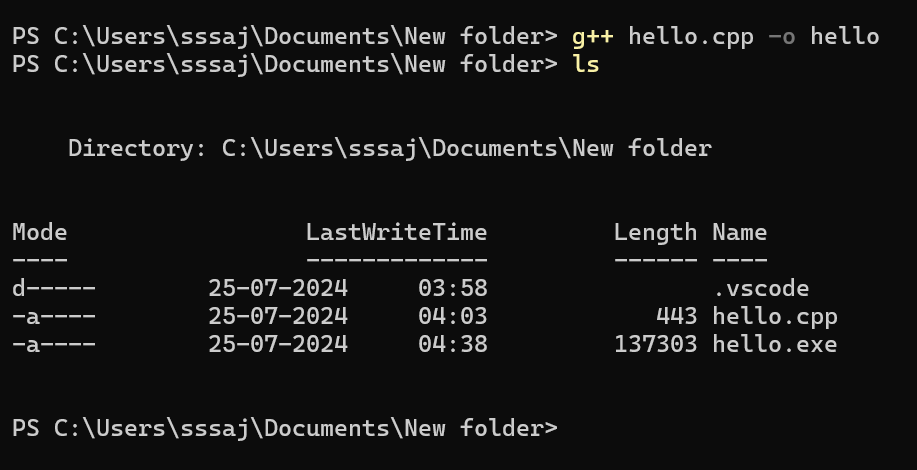
Open the executable file in a text editor
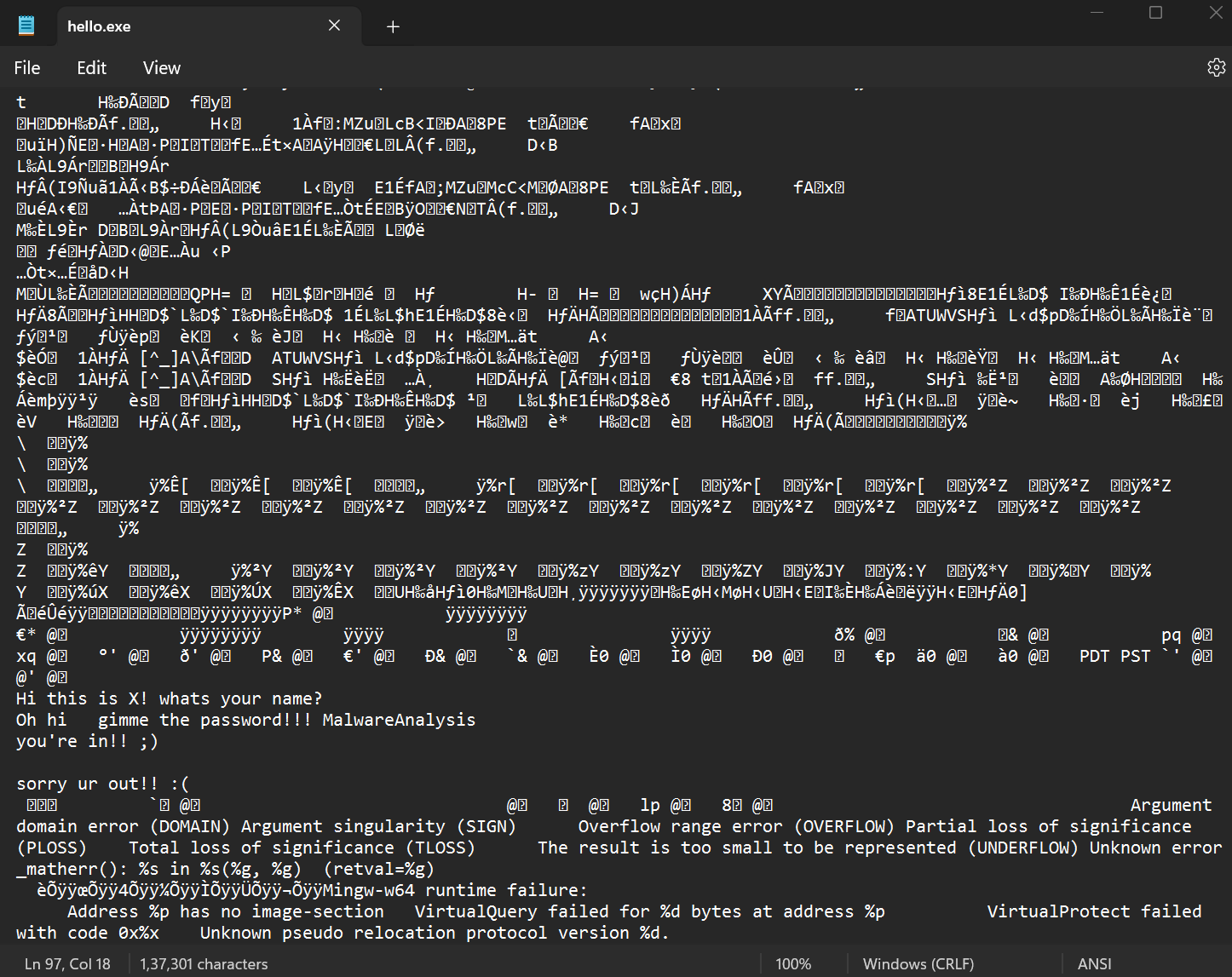
- ??? What are we supposed to do with this? Look closely and you will see some strings that are in the actual code
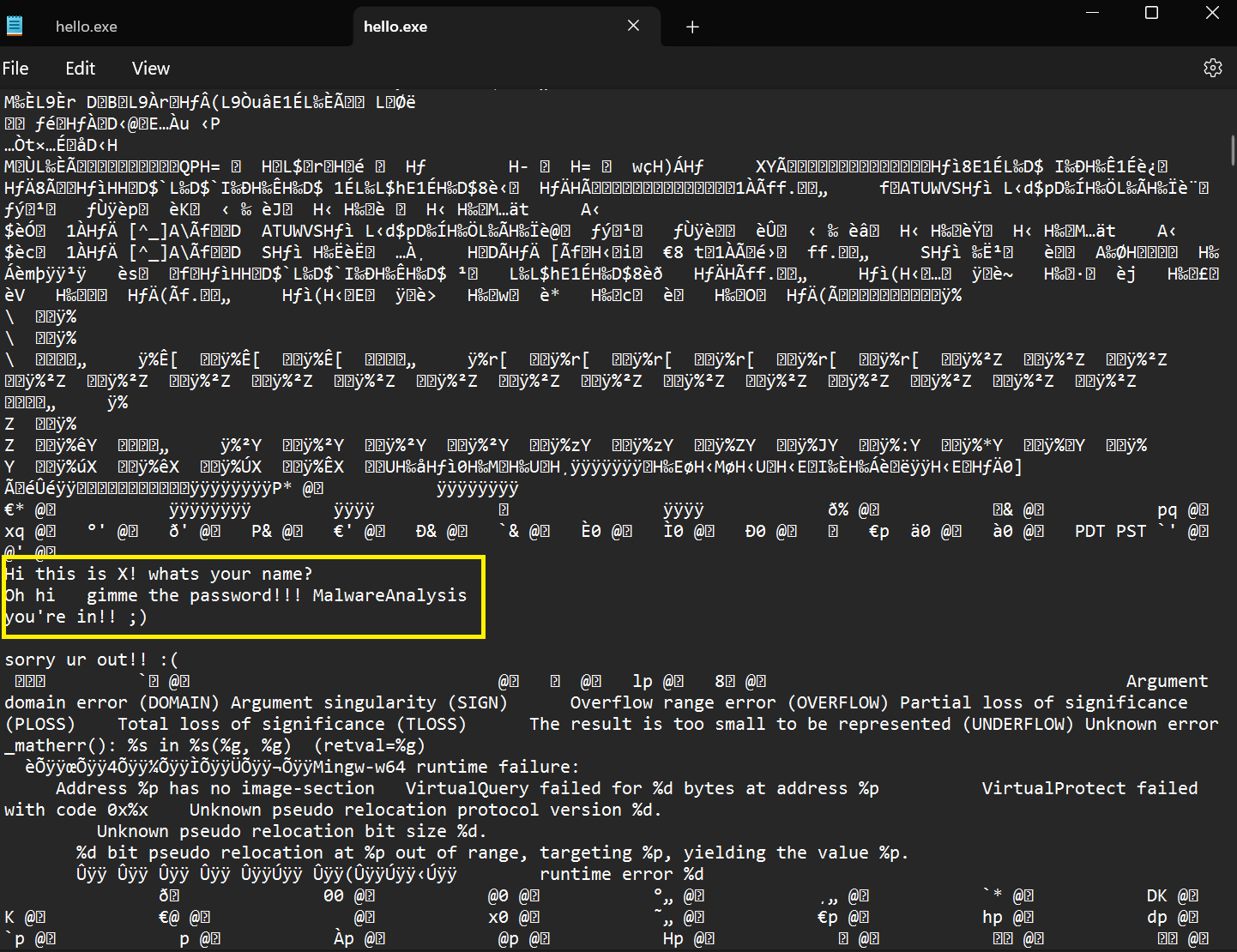
Now, remember you won’t receive the code with malware, you will only receive the executable. Imagine if someone just sends you this application (the .exe file) you will use several static analysis tools to get an idea of the executable before actually running it
- You can also use strings(or anything similar like floss) command to make the search much easier

- Is this all static analysis? No, these are just the basics there are plenty of stuff that we can analyze like PE sections, Magic bytes, packed/unpacked malware, etc.
Basic Dynamic Analysis :
- Again, This can be explained in a better way with actual live examples.
- But to give a basic overview, we run the malware (safely and securely using our lab) and intentionally let the malware destroy our systems to see what it does. Like what processes it spawns, does it access the registry and modify keys, does it drop a file somewhere in the system, or does it make a call out to some C2 sever (Command & Control server)
- We use many tools like Wireshark, INetsim, Procmon, Regshot, and Process Explorer to see what the malware has done by running it.
- This gives us a better understanding of what the malware does and how it works.
- This is all fine, but some malware authors put some effort into obfuscating these surface-level things. Some malware can detect if they are being run in a Virtual machine and stop execution. What do we do then? We move on to the next analysis method.
Advanced Static Analysis :
This is where our knowledge of assembly language gets put in use.
An executable is not a human-readable file, there might be some human-readable strings but its not fully understandable, in our above example(Basic Static Analysis) without the code we won’t know what the text means, and we won’t know that ‘MalwareAnalysis’ is a password. We will simply know it exists in the code.
so this is where we convert the executable file into a human-readable file …. kind of. By using disassemblers we can take machine-readable code and turn it into assembly code. But still, this is kind of hard to read, as assembly instructions are small instructions that are basically like a directive for the processor, so a simple code can produce a giant assembly instruction set. Look up assembly code for some common and simple programs and see if you can reverse it or identify the purpose without the actual code.
A common question that might arise is, if we can compile something, then decompilation should also be possible right? Yes and No, with some languages like C# or .NET, you might get near-perfect decompilation, But on C/C++ or Rust, No. It is still possible to decompile but compilation is a lossy process, it removes a bunch of information that is deemed to be not important for execution for the sake of optimizations. The resulting decompilations of the code from such languages will be crude and will be missing a lot of information.
There are many tools for this like Ghidra, Redare, IDA Pro, etc.
Advanced Dynamic Analysis :
- In this method, we execute the code with the help of a debugger, by using a debugger we can execute the code step-by-step and see all the registries, memory, etc. in real-time.
- we set break points, and we analyze the system during the runtime. Sometimes the code is obfuscated the strings are encrypted.
- Reversing this by hand will take a lot of time, so we let the program decrypt itself and read the texts.
- Again, this is harder to explain without actual examples so if you don’t understand any of these, don’t worry, we will perform all these on live samples to get a better understanding.
Lab Setup
- Now comes the actual lab setup, Setting up the Lab should be pretty easy, there are plenty of tutorials that explain this on YouTube and I’ll leave some in the Further Reading Materials section.
- The main purpose of this lab is to sandbox malware, i.e. to not allow the malware to be executed in an important place, with the help of virtual machines we should have a setup that can be repeatedly used for detonating malware.
- We need to download several Software and OSes for this lab, they are as follows :
- Windows 10 Enterprise edition(For FLARE)
- Remnux
- VIrtualbox/Vmware
- First, install Virtualbox or Vmware, both are fine and offer good features, but in my opinion, Virtualbox is better, it’s free (yay!), and it allows us to take snapshots(Vmware also has this feature but I believe you have to get the paid version.)
- Next, install the OSes(.iso files) and install them on your preferred hypervisor platform. Remnux has a .ova file that can be directly imported, so that shouldn’t be a problem.
- Windows will take some time but after installing it we can go on to install the FLARE VM on it, the GitHub page for FLARE will have the necessary steps to install it, This will take a long time to install. :(
- Create a private Host-only network in the interfaces section (for Virtualbox) and add this in the network section of both the VMs. Set up the network in both Windows and Windows and, in the Windows machine add the IP of our remix machine as the default DNS server.
- That’s it we are good to go. Also don’t forget to take snapshots of both the VMs
Working :
- The basic idea behind this setup is that, we use one VM to host the malware (FLARE) and one to emulate the services(Remnux); most malware (not all) request some kind of services on the network, HTTP, FTP, etc.. we provide a VM (Remnux) that acts as the server that receives these requests and communicate to the malware, we impersonate the real server that the malware is trying to reach. This is why we changed the DNS in the Windows box.
- By doing this every query that the malware makes will be directed to our remix machine, this machine will then act as the DNS server and give the malware the remix box address, so all requests are forwarded back to itself where it impersonates others services.
Further Reading Materials
- https://blog.christophetd.fr/malware-analysis-lab-with-virtualbox-inetsim-and-burp/
- https://www.youtube.com/watch?v=rmSIm3BKu3Y&t=2345s